Amazon Backend Keywords: The Complete Guide to Hidden Search Terms
Master Amazon backend keywords -- the invisible 249 bytes that can dramatically boost your product's search visibility. Learn best practices, common mistakes, and optimization strategies.
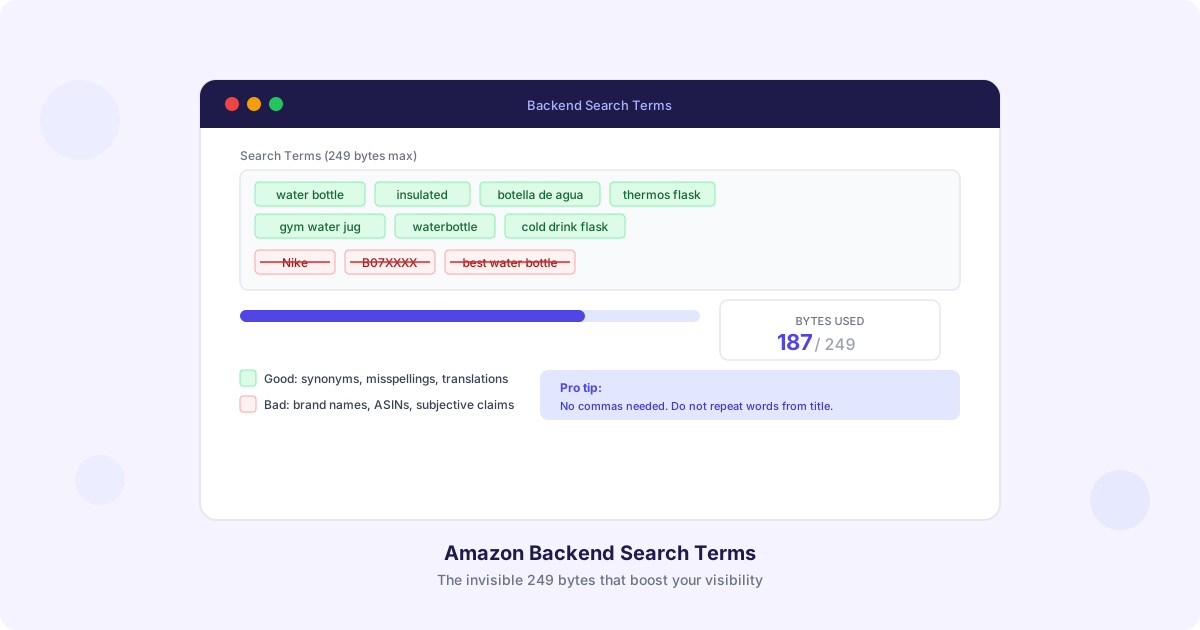
There is a field in your Amazon listing that shoppers never see, competitors cannot easily copy, and most sellers either ignore or fill incorrectly. It is called “backend search terms” — 249 bytes of invisible text that directly influence whether Amazon’s algorithm surfaces your product for relevant searches.
Backend keywords are one of the highest-leverage optimization opportunities available to Amazon sellers. They cost nothing to implement, take minutes to update, and can meaningfully expand the range of search queries where your product appears. Yet according to our analysis, roughly 60% of listings either leave this field empty or fill it with mistakes that actually hurt performance.
This guide covers everything you need to know about Amazon backend keywords: what they are, how they work, what to include, what to avoid, and how to verify they are working.
What Are Amazon Backend Search Terms?
Backend search terms are a hidden text field in your product listing that you fill out through Seller Central (or via the SP-API). They are not visible to shoppers on your product detail page, but they are indexed by Amazon’s A10 search algorithm. This means the words you put in this field can help your product appear in search results without cluttering your visible listing content.
Think of backend keywords as the invisible keyword layer behind your listing. Your title, bullet points, and description are the public-facing content that shoppers read. Backend search terms are the private layer where you can add additional keywords that do not fit naturally into your visible content.
Where to Find Them
In Seller Central:
- Go to Inventory > Manage All Inventory
- Click Edit on the product you want to update
- Navigate to the Product details tab (in the new Seller Central layout) or Keywords tab (in the older layout)
- Look for the Search Terms field (sometimes labeled “Generic Keywords”)
The field accepts up to 249 bytes of text. Note that this is bytes, not characters — this distinction matters for languages that use multi-byte characters like Japanese, Chinese, or Korean.
The 249-Byte Limit: What You Need to Know
Amazon enforces a strict 249-byte limit on backend search terms. Any content beyond 249 bytes is completely ignored — Amazon will not index any of it, not even the first 249 bytes. This is an all-or-nothing cut: if you exceed the limit, your entire backend keyword field is effectively empty.
Bytes vs Characters
For standard English text (ASCII characters), one character equals one byte. So 249 bytes gives you 249 characters.
For languages with multi-byte characters:
- German/French/Spanish (with accents like a, e, u): Most accented characters are 2 bytes each
- Japanese/Chinese/Korean: Each character is typically 3 bytes
- Emoji: 4 bytes each (do not use emoji in backend keywords)
How to Count Bytes
The simplest approach: count your characters, and if you are using only English/ASCII text, that is your byte count. If you are including words in other languages (like Spanish translations of your product keywords), count more conservatively.
Most listing optimization tools display a byte counter. If you are doing this manually, you can paste your text into any online byte counter tool to verify.
Formatting Rules That Save Bytes
Amazon has clarified several formatting rules that help you maximize your 249 bytes:
- No commas needed. Separate words with spaces only. Commas waste bytes.
- No quotation marks. They do not affect indexing and waste bytes.
- No repeated words. If a word appears in your title, bullet points, or description, you do not need to repeat it in backend keywords. Amazon indexes your entire listing.
- Lowercase only. Amazon’s search is case-insensitive. Using uppercase wastes no bytes but also provides no benefit.
- No punctuation marks. Hyphens, periods, and other punctuation are unnecessary.
A common mistake is formatting backend keywords like a CSV: “keyword1, keyword2, keyword3.” This wastes bytes on commas and spaces. Instead, use: “keyword1 keyword2 keyword3.”
What to Include in Backend Keywords
Your backend keywords should contain terms that are relevant to your product but do not fit naturally into your visible listing content. Here are the categories of keywords to prioritize:
1. Synonyms and Alternate Names
Different shoppers call the same product by different names. If your product is a “water bottle,” some shoppers might search for “water flask,” “drink bottle,” “hydration bottle,” or “water container.” Include the alternate names you could not fit naturally into your title and bullet points.
Example for a stainless steel water bottle:
thermos flask hydration jug drink container beverage holder canteen2. Common Misspellings
Shoppers misspell product names more often than you might think. Including common misspellings in your backend keywords captures searches that would otherwise miss your listing.
Example:
waterbottle watter bottel stainles stealYou might feel odd deliberately including misspelled words, but remember — shoppers cannot see these terms. They only help your product appear for searches that real people actually type.
3. Spanish and Other Language Translations
Amazon US has a significant Spanish-speaking shopper base. Including Spanish translations of your key product terms can capture searches from bilingual shoppers who search in their native language.
Example for a water bottle:
botella de agua termo botella termicaFor other marketplaces (UK, DE, FR, IT, ES, JP), include translations relevant to that marketplace’s secondary languages.
4. Related Use Cases and Occasions
Include terms related to how and when your product is used, especially if these did not fit into your visible content.
Example for a water bottle:
gym workout hiking camping office school travel road trip5. Complementary and Associated Products
Shoppers sometimes search for products in the context of related items. Including terms for complementary products or categories can capture these contextual searches.
Example for a water bottle:
lunch bag accessory gym gear fitness equipment hydration6. Size, Color, and Material Variations (If Not in Visible Content)
If you have specific attributes that did not make it into your title or bullet points, add them to backend keywords.
Example:
24oz 32oz one liter midnight blue forest green brushed metalWhat to Avoid in Backend Keywords
Equally important as what to include is what to keep out. Amazon has explicit policies about what is not allowed in backend search terms, and violating these policies can result in your listing being suppressed.
1. Brand Names (Yours or Competitors’)
Never include brand names in backend keywords — not your own (it is already in your listing) and especially not competitor brand names. This violates Amazon’s terms of service and can result in listing suppression or account warnings.
Do not do this:
yeti hydro flask nalgene contigo stanley2. ASINs
Do not include your ASIN or competitor ASINs. This does not help with indexing and violates Amazon’s policies.
Do not do this:
B07XXXXX B08XXXXX3. Subjective Claims
Words like “best,” “cheapest,” “amazing,” “top-rated,” and “#1” are not allowed in backend keywords. Amazon considers these subjective or unverifiable claims.
Do not do this:
best water bottle top rated cheapest premium luxury4. Temporary Statements
Do not include time-sensitive terms like “new,” “on sale,” “limited time,” or “holiday deal.” These become inaccurate over time and violate Amazon’s accuracy policies.
5. Profanity or Offensive Terms
This should be obvious, but Amazon explicitly prohibits offensive, abusive, or inappropriate content in backend keywords.
6. Words Already in Your Visible Listing
This is not a policy violation — it is a waste of bytes. Amazon indexes your entire listing (title, bullet points, description, brand field, and backend keywords) as a single searchable corpus. Repeating words that are already in your visible content provides zero additional indexing benefit.
If your title says “Stainless Steel Insulated Water Bottle,” you do not need to include “stainless,” “steel,” “insulated,” “water,” or “bottle” in your backend keywords. Those bytes are better spent on synonyms, misspellings, and alternate terms.
Backend Keyword Strategy by Product Type
Different product categories benefit from different backend keyword strategies:
Consumer Electronics
Focus on: model compatibility, connector types, technical specifications, use case terminology
compatible with macbook pro 2024 usb c thunderbolt charging station docking hubKitchen and Home
Focus on: room names, occasions, cooking methods, material alternatives
countertop breakfast nook apartment kitchen dorm cooking baking prepClothing and Apparel
Focus on: occasions, styles, body types, seasonal terms, fabric descriptions
date night casual friday business casual petite plus size breathable stretchyHealth and Personal Care
Focus on: conditions addressed, ingredient synonyms, demographic terms
sensitive skin hypoallergenic fragrance free unscented dermatologist testedToys and Games
Focus on: age groups, occasions, developmental benefits, play patterns
birthday gift toddler preschool stem learning educational montessoriHow to Check If Your Keywords Are Indexed
After updating your backend keywords, you need to verify that Amazon is actually indexing them. Here is how:
The ASIN + Keyword Search Method
- Go to Amazon’s search bar
- Type your ASIN followed by the keyword you want to test (for example:
B07XXXXX thermos flask) - If your product appears in the results, the keyword is indexed
- If your product does not appear, the keyword is either not indexed or your listing has been suppressed for that term
Bulk Checking
For sellers with many ASINs, manually checking each keyword is impractical. Tools like Helium 10’s Index Checker or similar services can automate this process. Peaklyst’s keyword governance panel also tracks which keywords are indexed and which are missing from your listing.
When Indexing Does Not Work
If keywords are not being indexed, check for these common causes:
- Exceeded 249 bytes. This is the most common cause. If you exceed the limit, nothing in the field is indexed.
- Recently updated. Amazon can take 24-48 hours to re-index your listing after changes.
- Policy violation. If your backend keywords contain prohibited content, Amazon may suppress the entire field.
- Category restrictions. Some categories have additional restrictions on what terms can be indexed.
Advanced Backend Keyword Techniques
Phrase Order Does Not Matter
Amazon’s search algorithm treats backend keywords as an unordered bag of words. The phrase “stainless steel water bottle” and “bottle water steel stainless” are indexed identically. This means you do not need to worry about keyword phrase ordering in your backend field.
However, this also means you only need to include each unique word once. If you want to target the phrases “insulated water bottle” and “insulated coffee mug,” you only need to write: “insulated water bottle coffee mug” — not “insulated water bottle insulated coffee mug.”
Combine with Your Visible Content
Remember that Amazon indexes your entire listing as one searchable unit. Your backend keywords should complement, not duplicate, your visible content. Think of your backend field as catching the search terms that fell through the cracks of your title, bullets, and description.
A strategic approach:
- Map out all the keywords you want to target
- Assign primary keywords to your title (highest weight)
- Assign secondary keywords to bullet points and description
- Assign remaining keywords — synonyms, misspellings, translations, and long-tail terms — to backend search terms
Regular Refresh Schedule
Backend keywords should not be set once and forgotten. Review and update them as part of your regular optimization cycle:
- Monthly: Check if new search trends have emerged in your category
- Quarterly: Review indexing status and replace non-performing terms
- Seasonally: Add seasonal search terms before peak periods (e.g., “christmas gift” in Q4)
- After competitor analysis: Add terms your competitors rank for that you are missing
Backend Keywords and AI Readiness
With the rise of Amazon’s Rufus AI shopping assistant, backend keywords play an additional role. While Rufus primarily evaluates your visible listing content for conversational responses, backend keywords still influence which queries surface your product for AI-mediated discovery.
When Rufus evaluates which products to recommend for a query like “What is a good gift for someone who hikes?”, it starts with search-indexed products. If “hiking gift” is in your backend keywords but not your visible content, your product still enters the candidate pool for Rufus to evaluate.
This means your backend keyword strategy should include:
- Question-format search terms (“how to keep water cold” for a water bottle)
- Problem-oriented terms (“prevent spills” for a leak-proof container)
- Occasion and gift-related terms where relevant
- Activity and lifestyle terms that match your target customer
For more on optimizing for Rufus and AI readiness, read our guide on CoSMo scores and how Amazon evaluates listing quality.
Putting It All Together: A Step-by-Step Process
Here is a practical process for optimizing your backend keywords:
-
Audit your current backend keywords. Log into Seller Central and record what is currently in the field. Check the byte count.
-
Remove waste. Delete any words that are already in your visible listing content, any brand names, ASINs, subjective claims, and unnecessary punctuation.
-
Research additions. Identify synonyms, misspellings, translations, use-case terms, and related terms that are missing.
-
Prioritize by search volume. If you have access to keyword research tools, prioritize terms with higher search volume. Fill the most impactful terms first.
-
Fill to 249 bytes. Pack the field as close to 249 bytes as possible without exceeding it. Every unused byte is a missed opportunity.
-
Verify indexing. After 24-48 hours, spot-check that your key terms are being indexed using the ASIN + keyword search method.
-
Schedule a refresh. Set a calendar reminder to revisit your backend keywords at least quarterly.
Backend keywords are one of the few listing elements that provide asymmetric returns: minimal effort, significant visibility impact, and no risk to conversion (since shoppers never see them). If you have not optimized this field recently, it is one of the best places to start improving your listing performance today.
For a comprehensive approach to listing optimization that includes backend keywords as part of a complete methodology, explore the Growth System overview or get an instant quality assessment with the free Growth Plan Wizard.